Case Study
Improving code review on GitHub
A product design process story highlighting several iterative projects following the initial release of the Reviews feature on GitHub in 2016.
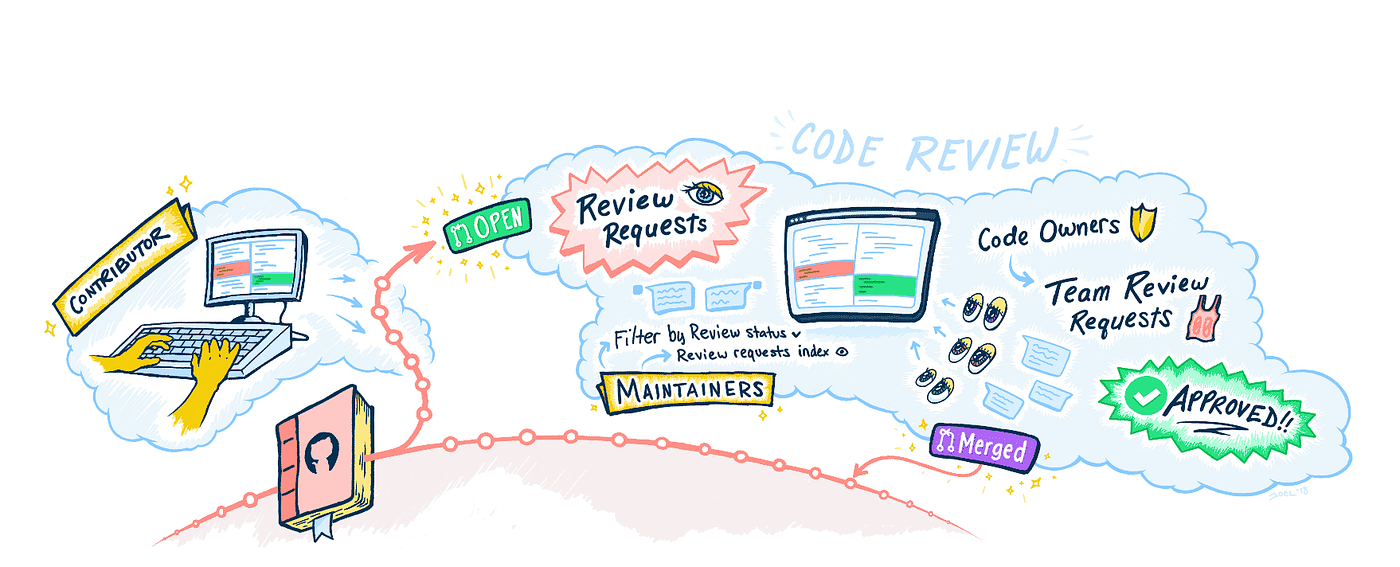
Making changes to a codebase can be intimidating — even if you wrote the original code yourself! 😅
Codebases evolve over time, and it often becomes unrealistic for any one person to keep track of everything in the codebase to ensure its quality.
Fortunately, if you’re working with a partner or team, you can always ask a teammate to review your changes! A second set of eyes can ensure that you are making a well formed iteration to the code, and also provide a sense of confidence in knowing that your work was peer reviewed.
GitHub Pull Requests have long been used for this exact purpose, but for a long time there was no explicit way to invite someone to review the changes you were proposing. Then, in September 2016, GitHub introduced the Reviews feature, which was a big step forward for the core collaboration workflow on GitHub. And it was just the beginning.
Developers quickly adopted Reviews because they formalized a common process pattern as a core level primitive in the GitHub workflow. Shortly after the initial release of Reviews, my team began to iterate on the code review experience by identifying areas of friction that could be removed for an easier and more efficient code review workflow.
This story highlights several of ships over the course of a year by Workflow Team Cactus from 2016 — 2017 to improve code review on GitHub.
Iterating based on feedback
Following the initial ship of Reviews, our team worked closely with the Support team and Enterprise Sales team to monitor feedback from both dot com customers and GitHub Enterprise (“GHE”) customers. We also listened to developers on Twitter and other social outlets where developers were publicly sharing feedback.
As we listened to feedback and observed how developers used Reviews for the code review process with their collaborators, a few common themes emerged:
- Contributors needed a way to signal when their pull requests were ready for review, and to request review from specific maintainers.
- Contributors often needed to catch the attention of repository maintainers if discussion in a pull request had gone stale.
- Maintainers needed a way to require review prior to a pull request being merged to ensure that code wasn’t merged carelessly or without sufficient review.
- Maintainers wanted to designate certain people as owners for specific files or directories corresponding to areas of responsibility to help distribute the review load across their organization’s teams.
By introducing a set of additional tools to supplement Reviews, we believed we could tighten the communication and synchronization gap between contributing developers and repository maintainers, making the code review process more efficient and more powerful.
1. Review requests
We decided to begin our iterations with a formalized way for a pull request author to request review from repository maintainers, as it was one of the most common themes we heard from feedback.
Starting here seemed like a reasonable way forward that would offer the greatest impact for the amount of effort required to design and implement, providing several immediate benefits to the code review process.
Initiating the review cycle
Review requests provided pull request authors a way to signal when their code was ready for review. While Reviews allowed for a formalized review process, often pull request authors aren’t ready for review the moment they opened a pull request.
Instead, many contributors practice an “open early for discussion” model of collaboration where a pull request is opened on the first commit well before the bulk of the actual code changes have occurred to help define scope and approach along with project maintainers.
Having a way to signal when a pull request is ready for review would allow them to discuss changes broadly after a pull request was initially opened. Once they were ready for more critical review of the specifics discussion could become more focused around changes proposed in the pull request diff.
Reaching the right reviewers
Pull request authors also wanted a way to be able to request review from specific people. Often a project’s maintainers and collaborators list is very large, so making sure a pull request gets reviewed by the right person or people could be difficult.
Refocusing attention in stale threads
When a pull request is initially created repository maintainers often take a quick first pass for triaging with labels and “at-a-glance” review. If the pull request can be easily merged, maintainers will often take action immediately. However, if the pull request requires further discussion, review, or additional changes sometimes the thread may go stale.
This often happens in open source projects where both maintainers and collaborators are volunteering their time to work on a project, meaning it’s easy for a pull request that cannot be immediately acted on by the maintainer to go stale. This also happens when maintainers are awaiting action by a collaborator who is unable to address feedback for some length of time.
Direct @ mentions in a pull request’s comments are often used to re-ignite discussion by either the collaborator or a maintainer, but we theorized that a more formal way to requesting review could be a more helpful signal for refocusing attention on a given thread.
Design process
We framed the feature in one basic Job To Be Done (JTBD):
As a repository contributor, I want to be able to request review from specific repository maintainers.
…and identified a few key components that would be necessary for an effective review request workflow:
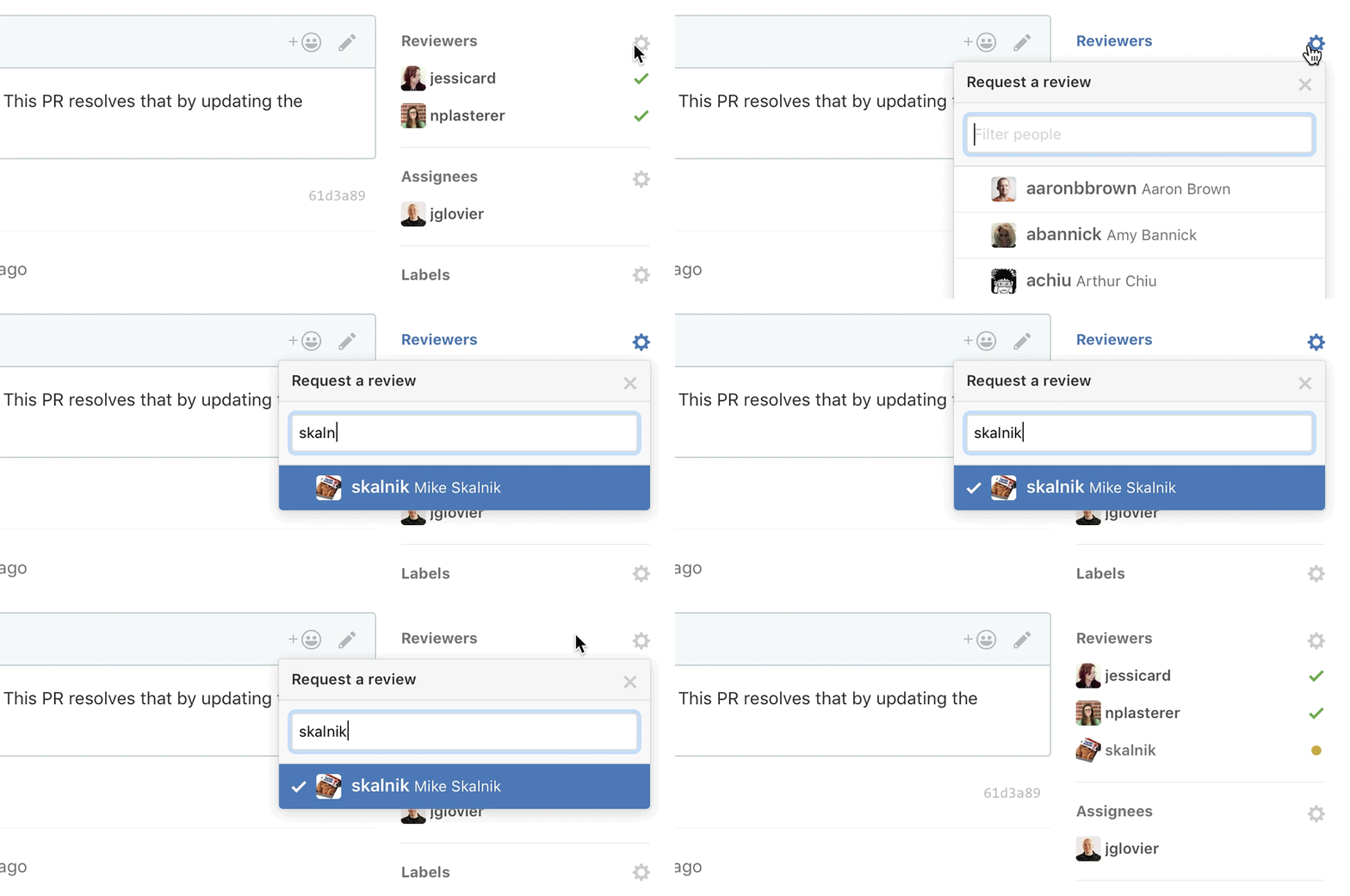
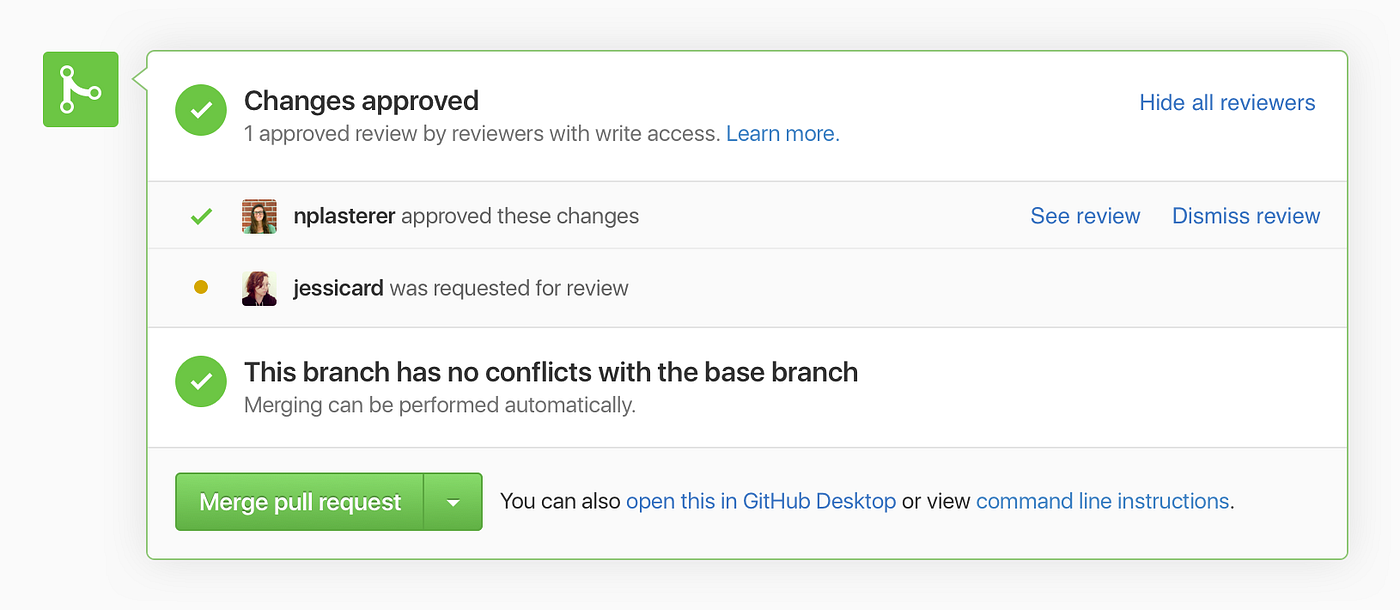
- A way to request reviews from the pull request view
- A way to notify requested reviewers of the review request
- A way to filter pull requests in the pulls index by review status
- Display review status in the pull request merge box
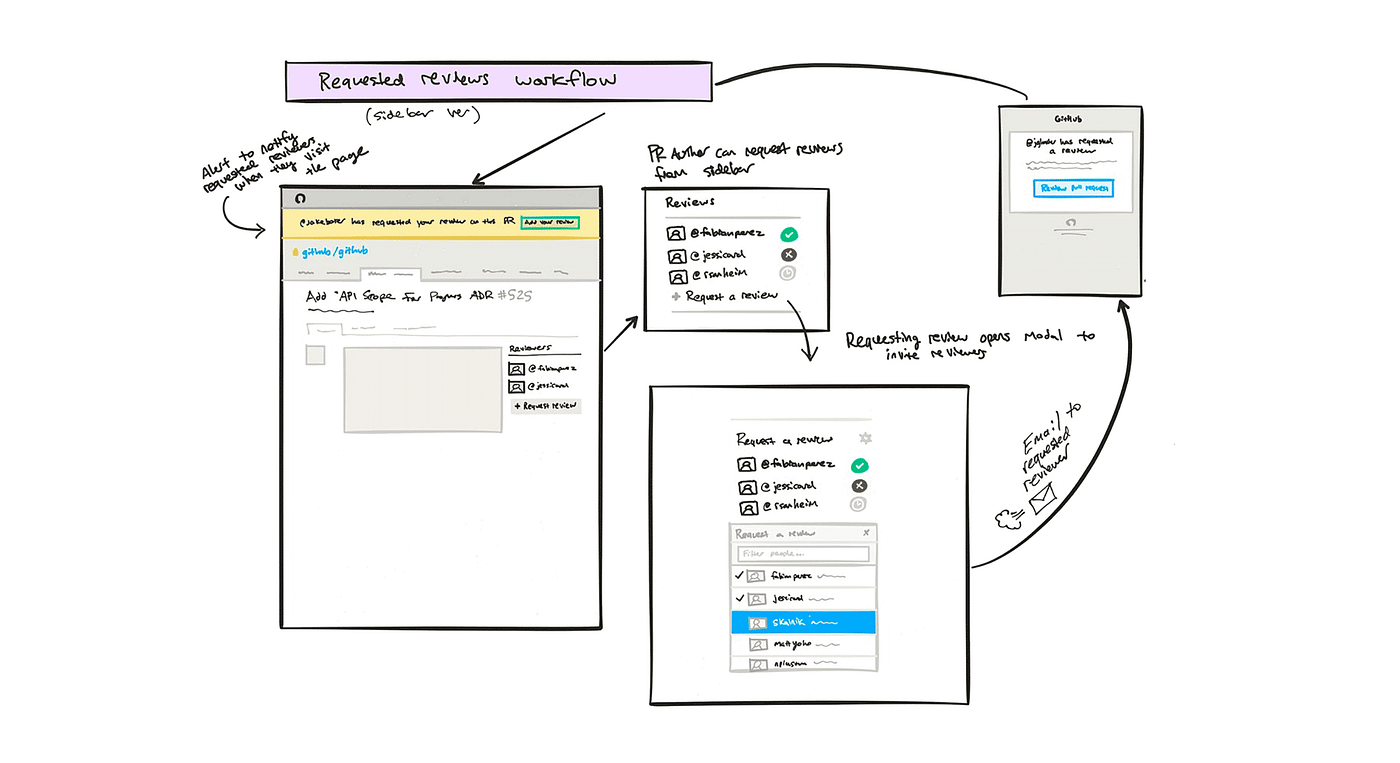
The most obvious place to include this feature was in the pull request sidebar which already contained primary actions related to the pull quest like labels, assignees, and milestones.
It even provided an existing pattern for both selecting people from the assignees select menu, and displaying them once selected. The biggest question was what states to display, and how to display them.
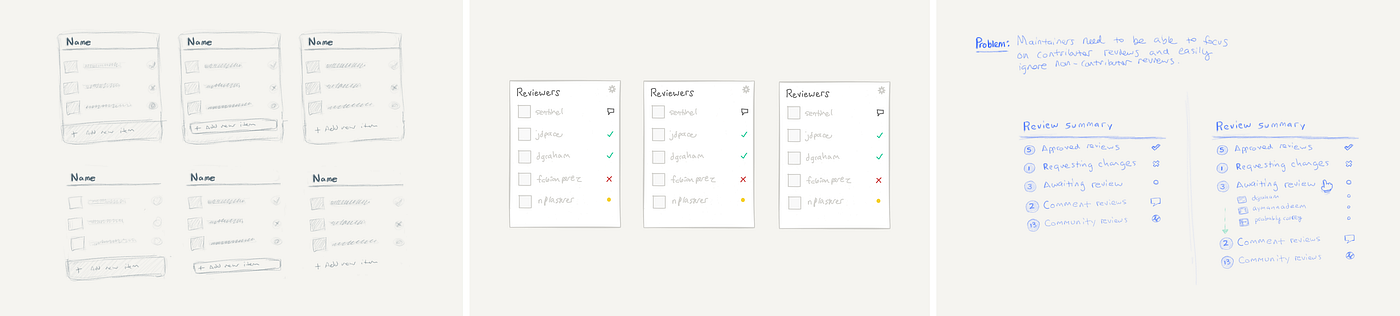
I also explored feature introduction, an alert to display for requested reviewers who were viewing the pull request to show that their review was requested, and displaying the review status in the merge box along with status checks.
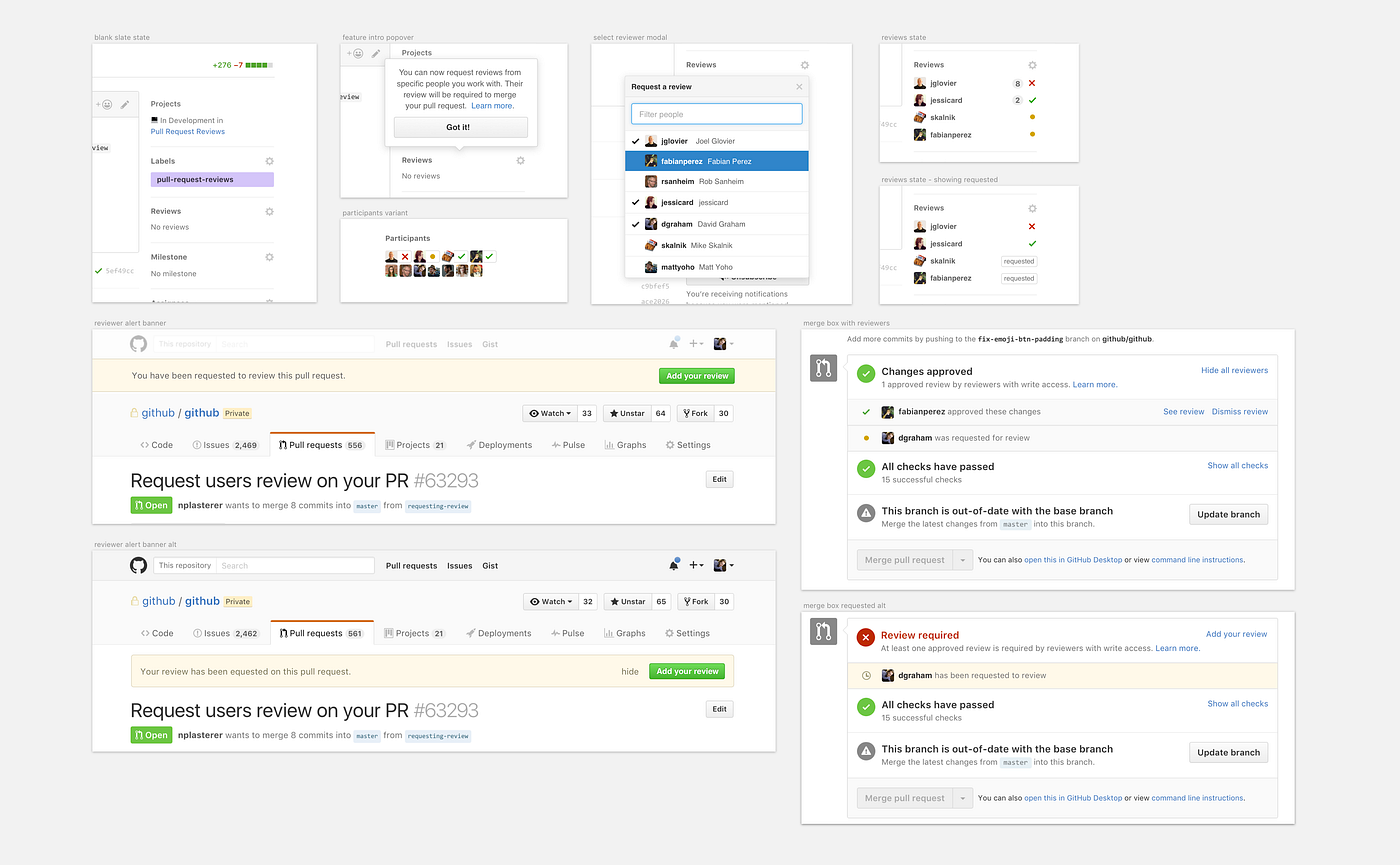
We had several key questions to address in the exploration process:
- What is the primary use case for requested reviews?
- Should requested reviews be required for merging by default?
- Should review requests be exclusive? (i.e. review only allowed from the requested reviewer)
- How many people can be requested for review?
- Can you request from a whole team, or just individuals?
- How do I know who to ask for review?
- What users are shown in the reviewers select menu? Any contributor who is part of an org?
- Should we provide a way to indicate why your review was requested?
Ultimately, as with many new features and workflows, we leaned toward gut assumptions, testing with an early staff ship and internal feedback, and then learning from the initial ship once people are using the feature in production.
We settled on a path forward, making decisions based on establishing a reasonable scope for our timeframe and prioritizing for uses cases we knew were important to existing users based on prior Support feedback and feature requests.
We cut a few things from scope that we thought we may need eventually, but knew could be added later, including:
- team review requests (cut for product concerns)
- filtering pull requests by review status (cut for scope)
- requiring reviews for merging (cut for scope)
- web notifications for requested reviewers (cut for product concerns and scope)
We staff shipped the feature for a few weeks to help surface important product issues to resolve and bugs to fix, and identify points of friction in our own real use cases.
Support helped us QA the feature, uncovering edge cases and unconsidered scenarios (e.g. “what happens to a pending review request that person leaves the org?”).
We used data from usage of other features for comparison and to help inform final decisions. And we tweaked things like copy and UI wording, addressed front-end and back-end bugs, and added final polish to the design.
In December 2016, we shipped Review Requests to general availability. Developers were pretty excited about the feature.
Listening to feedback
We started listening for feedback as developers began to use Review Requests. Again, we heard some common themes that helped us measure our decisions and prioritize further iteration.
We grouped feedback into two categories:
- Workflow related friction (e.g. things that kept the feature workflow from feeling easy to use)
- General UI improvements (e.g. things that were confusing to understand, bugs, etc)
Our team prioritized projects by workflow impact, and general UI improvements happened within the scope of a specifically defined workflow project. The most common workflow related themes we heard were:
- How can I view all pull requests where I’ve been requested for review?
- After a review is given, I want new commits pushed to dismiss my review and re-request.
- I want to request review from an entire team.
- I want to use search filters to see pull requests in my repo index by review status.
- API support and webhooks
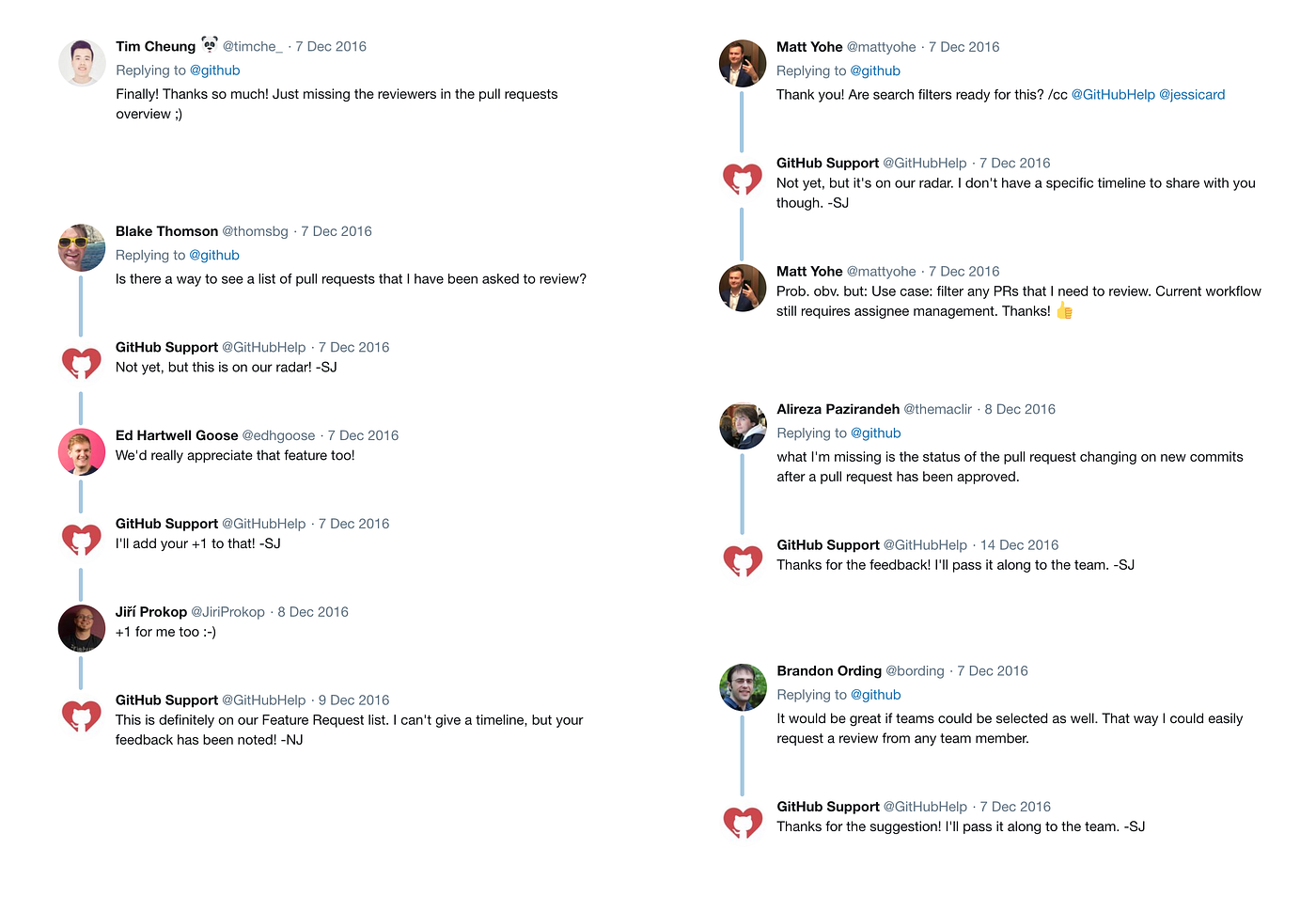
Our team had a pretty clear idea of what we still wanted to build after the initial release of Review Requests, but listening to feedback helped us prioritize what to tackle next based on the biggest friction points.
2. Filtering pull requests by review state
The next code review improvement we decided to tackle was the problem of how to easily get to pull requests where your review has been requested.
It was clear from feedback and our own use of the feature that finding places where your review has been requested was the biggest point of friction in the experience, something we intended to address with the initial ship but cut for sake of scope and momentum.
Design process
The basic JTBD for filtering was:
As a maintainer, I want to be able to easily view a list of pull requests in a repository where my review has been requested.
We explored two options for addressing this workflow, both of which would require adding support for text-based search filters for review requests.
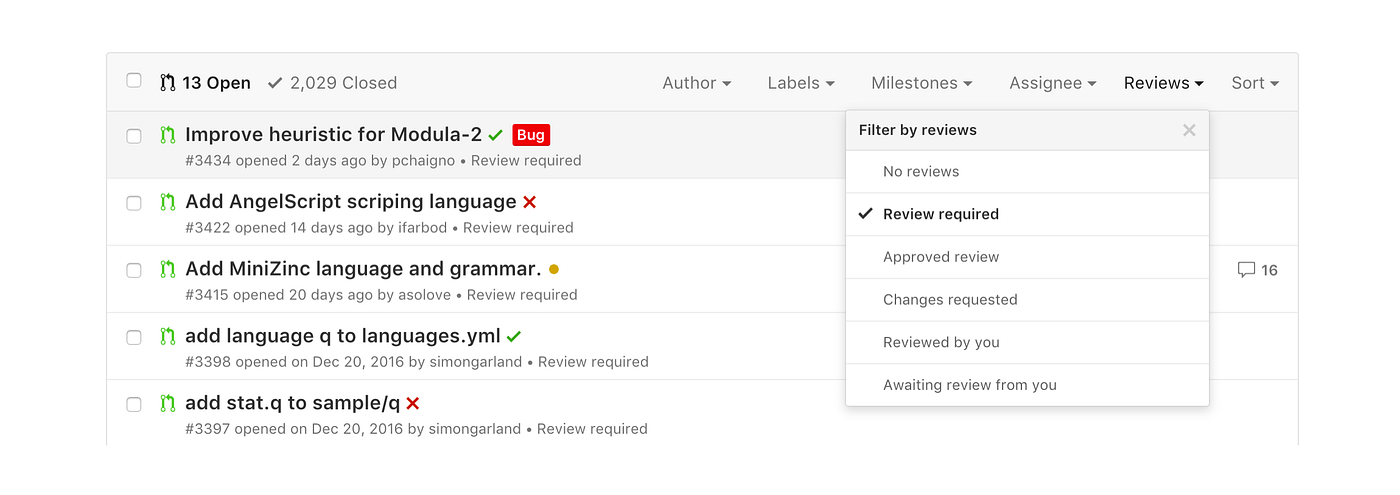
Maintainers already had a strong set of tools for filtering pull requests based on criteria such as labels, milestones, and assignees via the repository pulls index filters. Adding another category to filter the list by review status seemed like an obvious solution.
Explorations largely focused on how to include the review status itself in the pull requests index list.
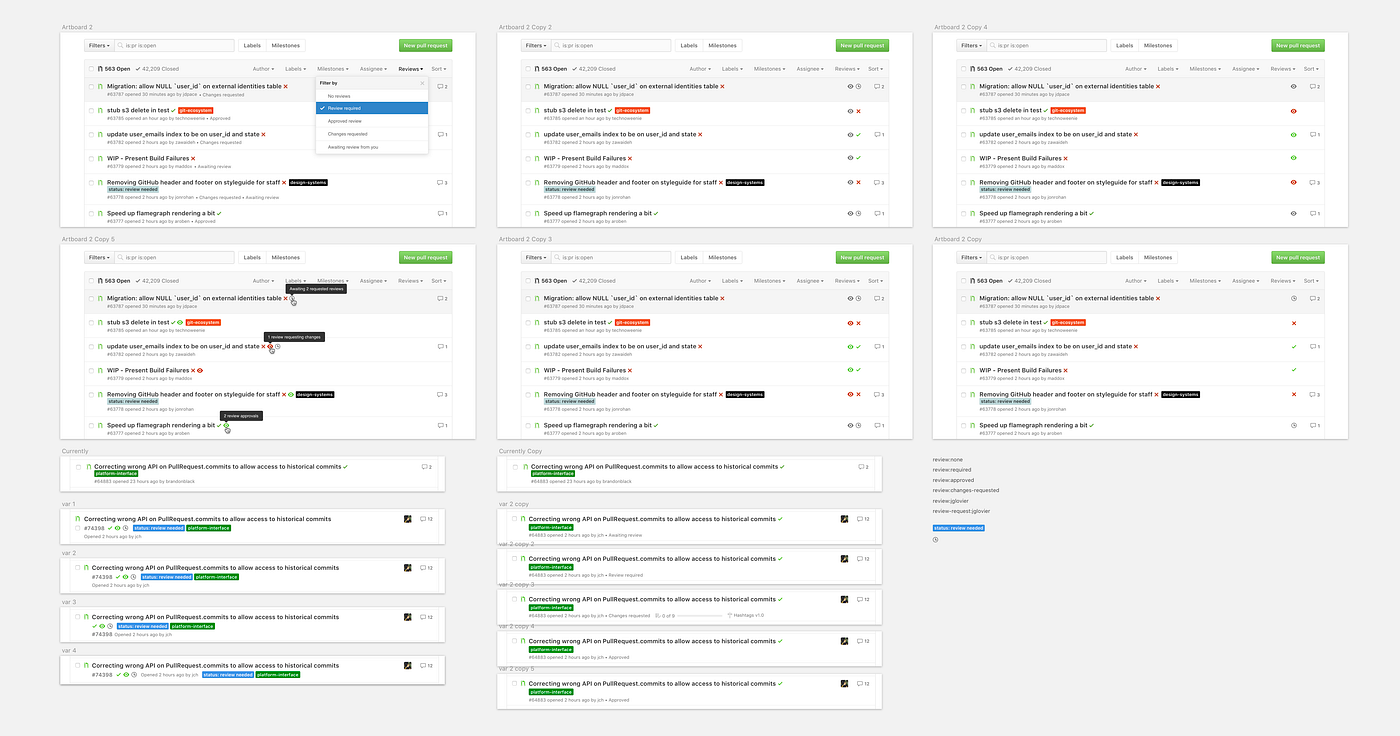
It became clear from exploration that adding more elements to the issues index was going to be difficult within the current layout, and reworking the layout more broadly was beyond scope of our efforts, so we opted to simply include the review status as an additional text item in the meta info for each issue in the index along with a Reviews drop down menu.
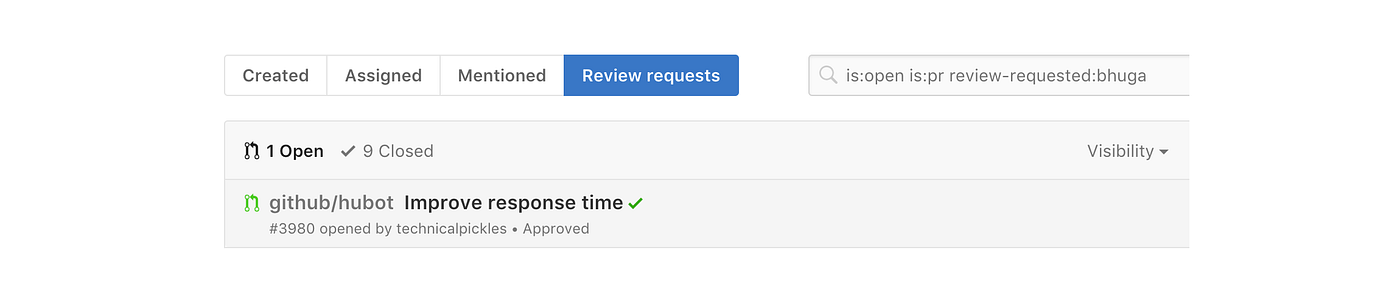
A less used but very powerful feature of the GitHub UI is the pull requests dashboard, which provides a place to see all of your current work and what still needs your attention. This seemed like another good place to surface review requests, so we also decided to add an additional tab to this existing interface for viewing pull requests from all repositories where your review has been requested.
The following January, we shipped Pull Request Review filtering to generally positive feedback from developers, and we listened carefully to post ship feedback once again, looking for themes to help inform our next steps.
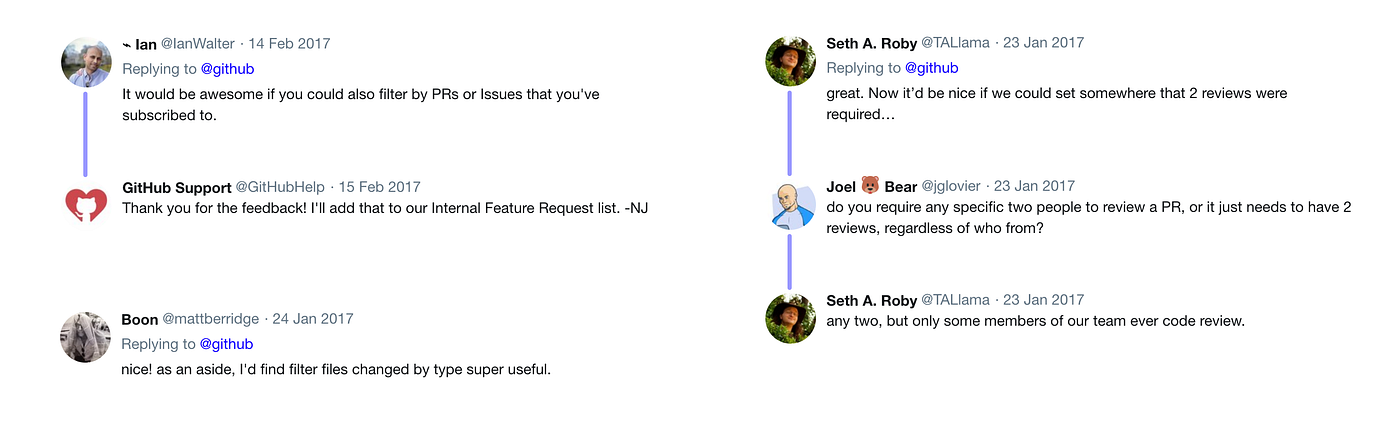
We continued to hear helpful suggestions from vocal users on Twitter and other social sites, and of course directly via our Support channel and through Enterprise customer communication.
3. Team review requests
Organization maintainers on GitHub use the Teams feature to help distribute maintainer responsibilities and focus communication with team @ mentions. Adding Team support to Review Requests seemed like a natural next step.
The motivation for Team review requests was that there may be times when changes could be reviewed by any number of people on a team in your organization, and choosing a specific person may seem arbitrary or unhelpfully limiting.
We considered supporting review requests for teams as part of the initial Review Requests ship, but decided against it partly for product concerns, and partly for scope and timing.
From a product perspective, we simply weren’t convinced that allowing entire teams to be requested for review was a helpful signal.
Something we’d often observed in use of team @ mentions is the “somebody else will respond” phenomenon, which meant it was typically more effective to @ mention a person directly to get a response.
However, as we listened to feedback from our initial ships we learned that people really wanted this feature, and while our concerns about the anti-pattern we had observed previously was enough to keep us from adding it to the initial ship, it wasn’t enough to keep us from offering the feature to teams who really wanted to use it.
We concluded that the anti-pattern we were concerned about was not a reflection of the usefulness of the Teams feature, or @ mentioning teams, but likely more a function of how teams organize themselves, and whether they have best practices or guidelines in place for guiding their own use of the feature.
We also knew that the Code Owners feature work on deck would need Team review requests to be truly effective for large scale organizations.
Design process
Design work began with a simple JTBD:
As a pull request author, I want to be able to request review from a team in my organization.
The visual design process for adding Team review requests started with re-using existing patterns from the initial Review Requests ship.
The real challenge was designing the matrix of review states for Teams.
With Review Requests for individuals, the expected behavior was obvious. If a requested reviewer had been requested but not provided a review, the state was pending. If they had provided a review of passing or changes requested, the state reflected those decisions in the merge box. And if the reviewer left a neutral review, it was not counted toward the merge requirements.
With Teams, however, the status matrix was more complicated. Because multiple members of a team could leave a review, we had to sort out what the various permutations for review state and merge state would mean based on the possible variants.
We staff shipped the feature and began to see how it felt in real use cases, helping us to uncover bugs like how Team requests was working with the Nested Teams feature (which was in development at the time) and Suggested Reviewers, and details like who should be subscribed to a thread when a team is requested for review.
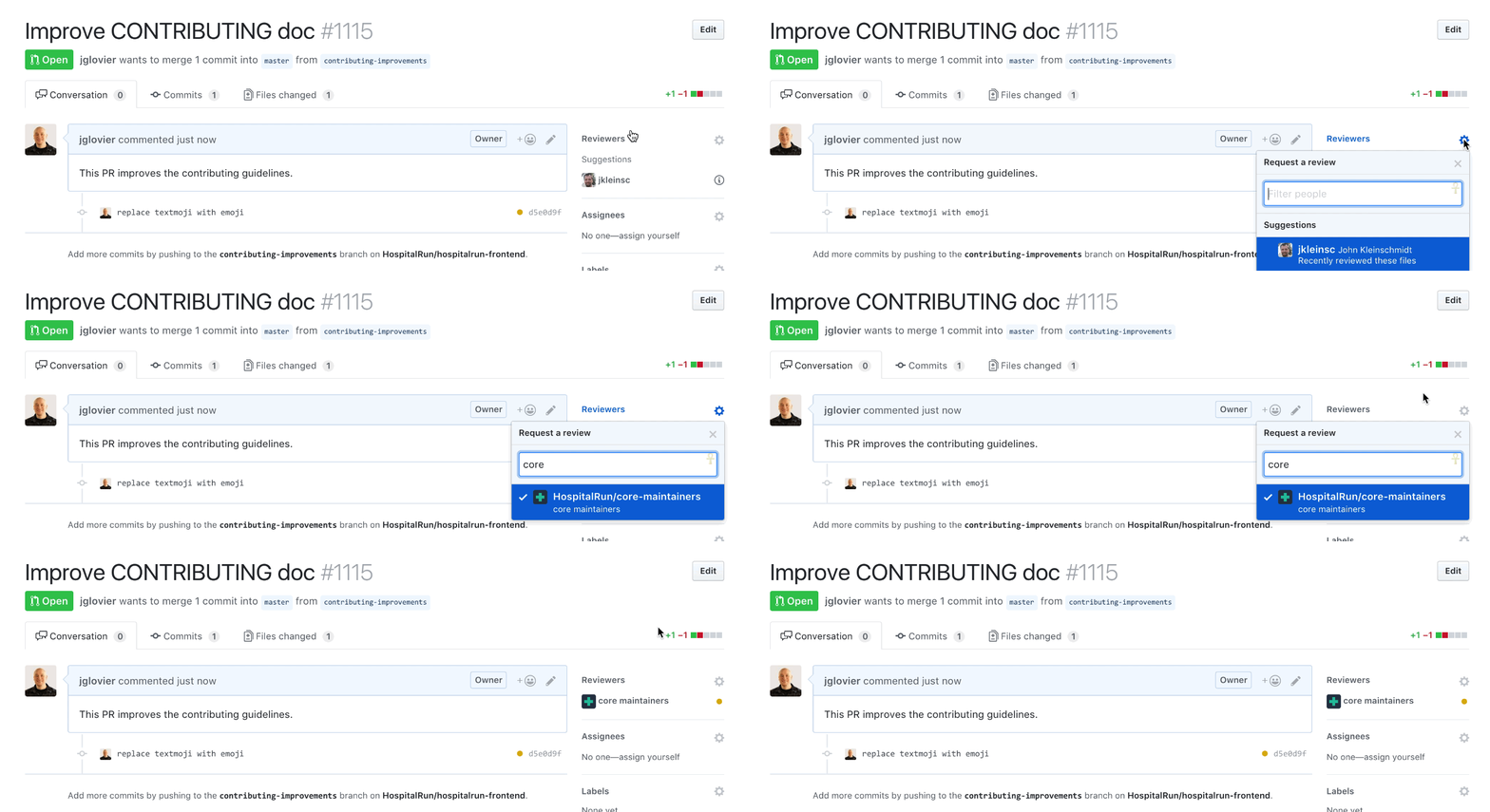
In July — intentionally just a few days before shipping Code Owners — we released Team Review Requests and continued listening to developer feedback.
4. Code owners
With Review Requests, code review on GitHub now had an explicit way to initiate the review cycle, but it was still a manual process ripe for automation.
The burden of review still fell on PR authors to request review (which assumed they knew who to request–something many first time open source contributors could not be expected to know), and on repository maintainers to make sure the right maintainers provided review of a given pull request.
What we really needed was a way to assign file ownership to repository maintainers that could automatically request or require review from the owners based on changes proposed to those files.
The idea had been in consideration for some time prior to shipping Review Requests, but sequencing correctly was critical in taking action, as the Review Requests feature provided an important workflow foundation for Code Owners to build on.
Who should be reviewing my changes?
In some cases (such as private repositories with company collaborators) workflow considerations like who should review changes to certain parts of a codebase are solved by organizational structure and communication happening at the company itself outside of the GitHub platform. Those structures are then simply carried into and mirrored in the GitHub workflow.
But in other environments (such as open source collaboration with contributors who have no pre-established relationship with repository maintainers) it can be hard to know how to best work with project maintainers.
This ambiguity faced by open source contributors (especially first time contributors) can be mitigated by README files in a repository, or by a contributor file provided by maintainers.
Making the contribution experience for open source collaborators as approachable as possible is an important product philosophy, and we saw an opportunity to remove even more of the workflow ambiguity by giving maintainers a way to designate who was responsible for reviewing specific parts of the code base.
Reducing the triage burden for maintainers
For repository maintainers with a large number of incoming pull requests, often a significant amount of time is spent triaging them with labels, comments, reviews, and review requests to other more maintainers who would be more appropriate reviewers.
A code ownership mechanism could provide a significant benefit to maintainers in this initial triaging process, removing the cognitive load of at least some portion of their incoming pull requests by automatically handling review requests for designated owners.
Design process
The design process was framed around three key JTBD:
As a repository maintainer, I want to designate specific maintainers in my organization as "Code Owners" over specify globs of code in my repository.
As a Code Owner, I want to be automatically requested for review on any pull request that proposes changes to files that include globs for which I am responsible.
As a repository admin, I want to enforce required review for globs that have a designated Code Owner.
Design initially focused on a visual interface for editing the owners file. We assumed that we would need to create a custom visual experience for matching Code Owners with file globs, likely somewhat similar to the experience of adding members to an organization team.
I explored a lot of variations for configuring code owners and globs, initially centering around a Settings style experience.
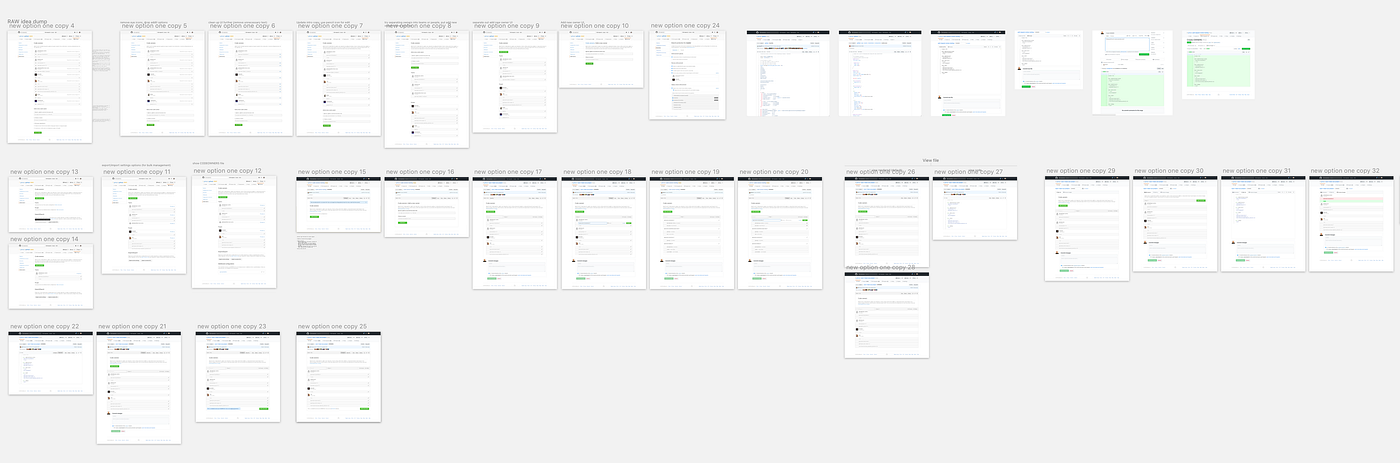
Eventually, however, we began to ask the key question that led to how we approached the final implementation: why should we store code owner configuration data in a repository settings table when we could simply version it with the rest of the code in git?
The answer, we decided, was that we should absolutely store the code owner data in Git instead of as repository Settings data. This would solve a number of challenges and reduce scope of implementation, as well as provide the benefits of version control to the Code Owners experience.
With that decision made, workflow design focused on a custom file rendering experience, and it quickly became clear that a visual editing experience was simply not necessary for what we were trying to accomplish (at least for the initial ship), and we narrowed the scope to simply a custom repository file with syntax modeled after the git attributes pattern to define code owners based on file globs.
We looked to a few projects for inspiration and prior-art, including our own Brandon Keepers’ OWNERS project, Google Chrome and Kubernetes usage of .OWNERS files and Mozilla and Linux usage of .MAINTAINERS files. We worked with our analytics team to uncover some data insights (e.g. digging into usage of OWNERS and MAINTAINERS files in public repos on GitHub) to help inform our decisions, and settled on a final direction.
By this point we had whittled the remaining design problems down to a few basic UI implementation details:
- Should code owners be separated from non-owner reviewers?
- What icon, label, or other styling is most appropriate to distinguish code owners from non-owner reviewers?
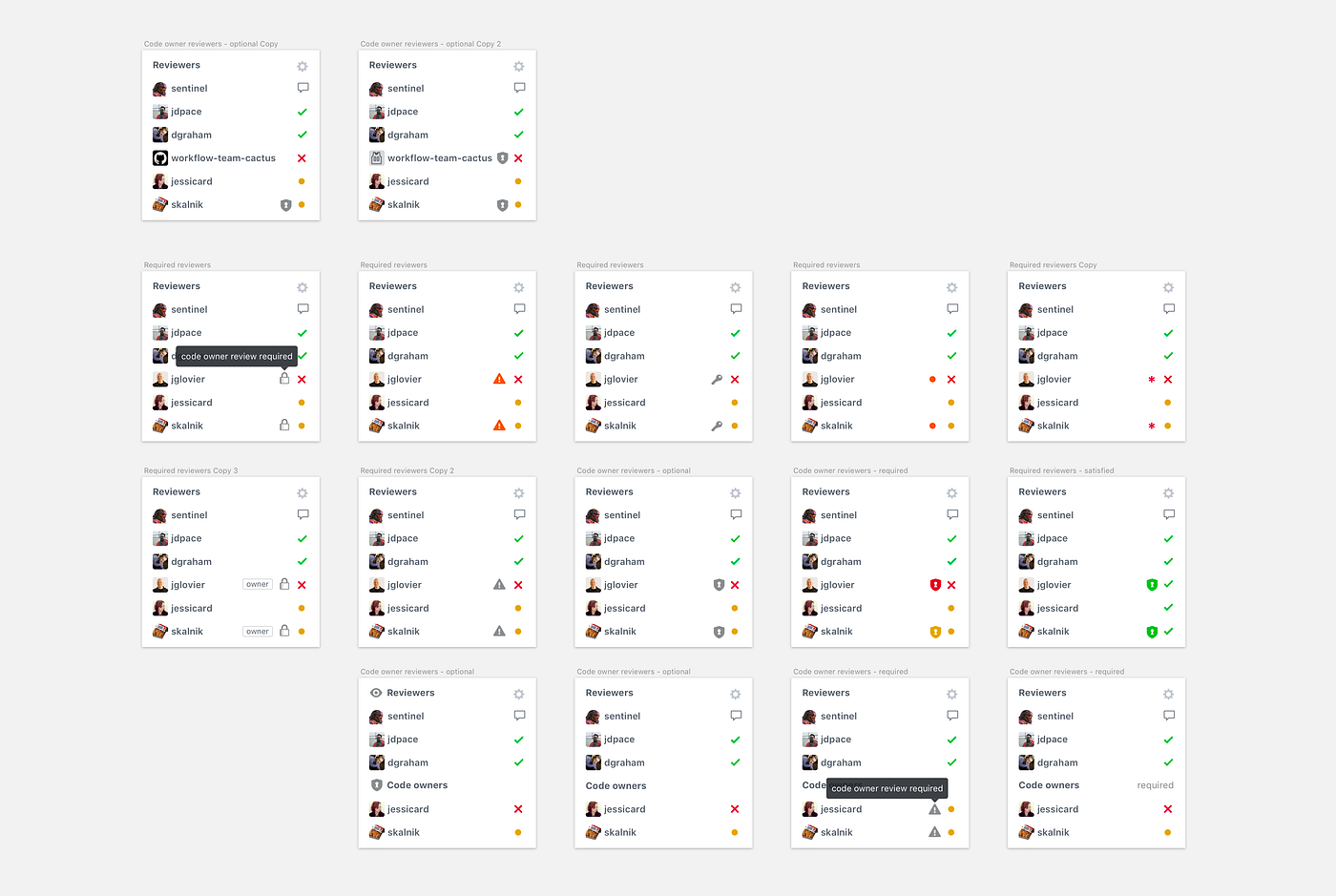
In July 2017, just a week after shipping Team review requests, we shipped Code Owners to general availability, and within six months from launch we saw over 720,000 review requests to Code Owners across 350,000 pull requests in 6,600 repositories.
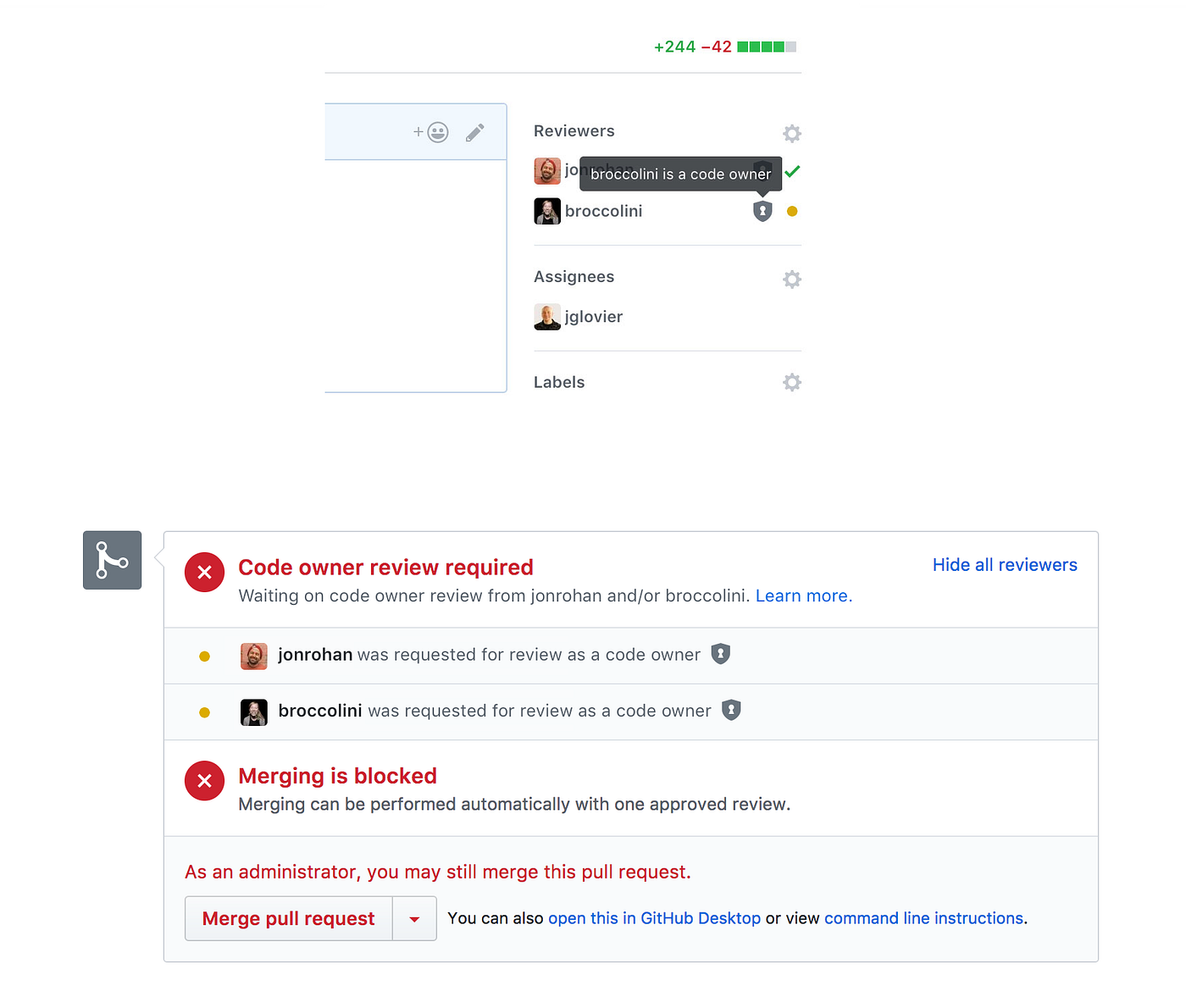
Listening to feedback
We received lots of helpful feedback from developers who were using Code Owners in ways we had not considered, or just not prioritized in the initial release.
Some ideas we heard and things we learned from listening to feedback:
- Could Git history be used to determine or inform code ownership?
- Can review be required from multiple teams?
- Can I suggest review from Code Owners instead of request or require?
- Could we have a more elaborate hierarchy of owners with higher level owners able to unblock review required by lower level owners?
- Many developers were familiar with the pattern used in the Chromium project where Owners are defined in a per directory basis, and wanted to use GitHub Code Owners in the same way (also similar to how .gitignore works).
Per our intentionally designed practice, we carefully considered and documented all of the feedback received, and used it to inform further iterations.
5. Including Protected Branches support for increased code security
Many organizations use protected branches to ensure code passes required status checks prior to merging to the default branch — a critical protection configured on a per-repository basis to ensure code the production branch is always secure and reliable.
Organizations relying heavily on protected branches wanted to extend that protection to the code review process by requiring review in the same way they could already require status checks.
Requiring reviews on protected branches
Once we shipped requesting review from maintainers, we added the ability to require reviews prior to merge, similar to how status checks could be required for mergability.
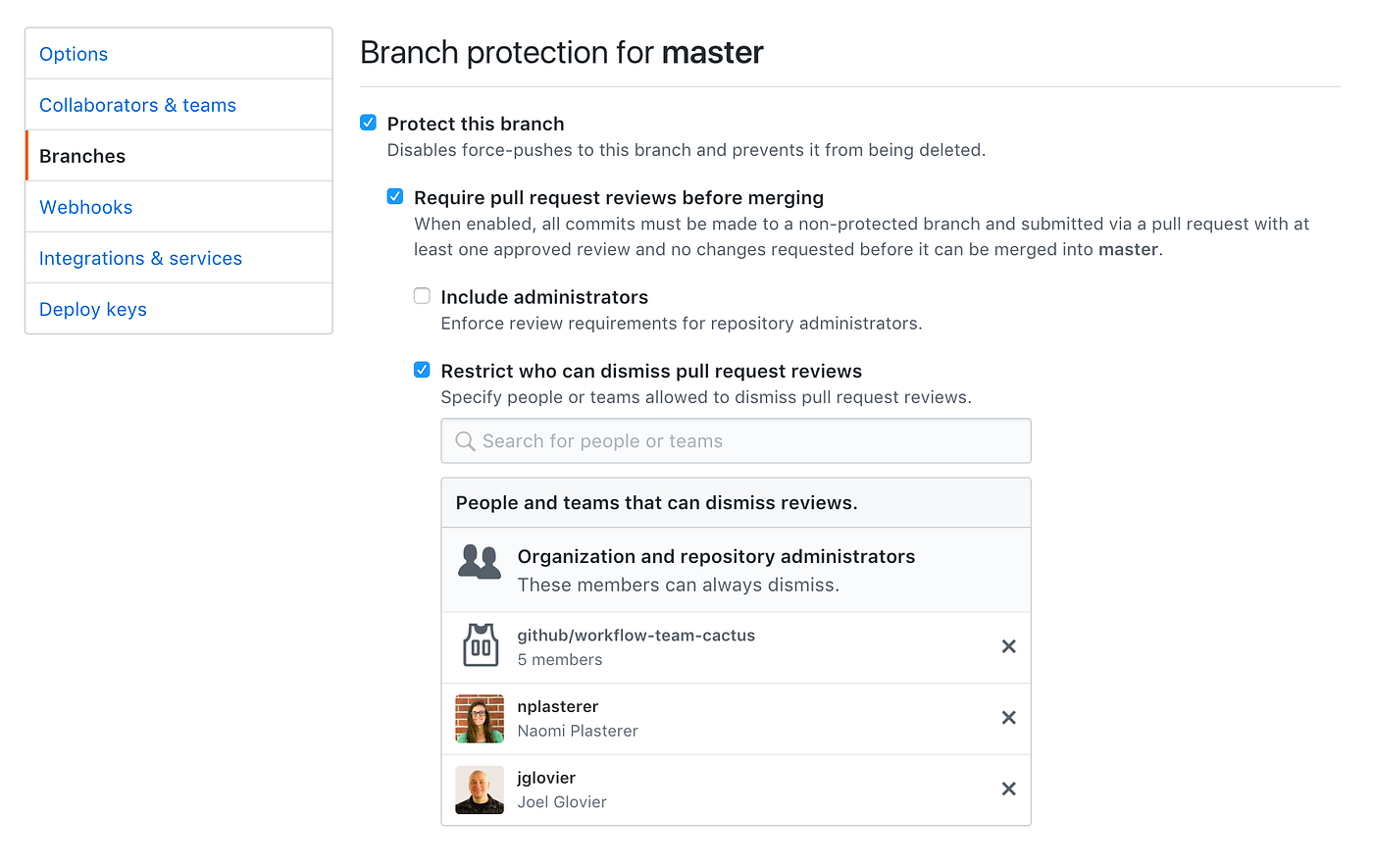
This allowed Code Owners to serve as “keepers of the code” in organizations that relied on a stricter code review process making use of accountable humans for high security code and highly regulated software products such as those found in the automotive and healthcare industries where government regulations are often involved.
Requiring review allowed maintainers in these high security environments to enforce stricter workflows for their internal code collaborators.
Restricting review dismissals
To further empower maintainers who needed greater control over their production codebase, we also added a protected branches setting to limit or remove the ability to dismiss a review, a workflow privilege given to maintainers by default.
This eliminated a potential loophole for hasty contributors who may be seeking to get their pull request merged without properly addressing feedback left in reviews.
Dismissing stale reviews when new code is pushed
We also heard from some developers who wanted the ability to re-require reviews when new code was pushed to a pull request after review was given, an extra layer of protection that was vital to their workflow.
For many teams this level of restriction isn’t necessary, but for teams where the result of code errors slipping into production can mean critical risk for the health and lives of people this level of security it is a must.

We decided to add the feature as an additional protected branches option (disabled by default) that maintainers could enable to accommodate this higher level of code security.
Final reflections
Throughout 2016 and 2017 I had the privilege of working with Workflow Team Cactus 🌵 on improving code review on GitHub.
After I left the team to focus on another project, they continued to ship many additional iterations and improvements (suggested reviewers, requiring multiple reviews, etc) that have made code review on GitHub one of the top code collaboration experiences in the software industry.
I’m proud of the work we accomplished together, and how code review on GitHub continues to progress and evolve.
Workflow insights
Through this work, I learned a lot about how people use GitHub to collaborate on code together, and how teams do code review. The key takeaway being that there are multiple ways these things happen, and trying to be prescriptive is not as helpful as allowing flexible options that support an individual teams workflow.
It’s important to identify the key use cases to solve for, but not fall into the false dichotomy of seeing support for each persona’s workflow as binary.
For example, the primary acting contexts of a GitHub user can vary depending on things like:
- public or private repo?
- contributor, maintainer, or admin?
- personal or organization repo?
- open source, personal, or work project?
While there are key contexts to identify, there are also several variables that each workflow may need that affect user behavior.
At the time of this work we had not identified a particular group that was most important to solve for, so we treated all potential contexts as important considerations for design and product decisions.
Critical reflections
On the Code Owners features — in hindsight I wish I had the foresight to spend less time exploring and pushing the design comps for the visual UI product direction. I was so excited about the idea of helping making code owners super simple to use that I overlooked the simplest path forward (a plain text file versioned by Git) and it took department leadership to come to this conclusion themselves.
I wish I had seen that that direction was the best initial path forward and been the one pushing for it, but I was probably a bit clouded by the experience I had already envisioned and committed to. That was a huge lesson about product thinking that I had to learn from.
People involved in this work
Many people were involved in shipping this work and I’m grateful to have gotten to collaborate with them.
- Naomi Plasterer, Engineering lead (Review requests, Filtering)
- Jared Pace, Engineering lead (Code Owners)
- Joel Glovier, Product design lead and PM function (all projects)
- Jessica Card, Engineering contributor (Review requests, API & Graph QL)
- Brandon Keepers, Engineering & product contributor (Code Owners)
- Mike Skalnik, Engineering review (Review requests)
- Rob Sanheim, Engineering review (Review requests)
- Joshua Peek, Engineering review (Review requests)
- Miju Han, Data & analytics support (Code Review)
- Rafer Hazen, Data & analytics support (Code Review)
- Francis Batac, Technical support ombudsman (Review requests)
- David Graham, Engineering manager, engineering review (Review requests)
- Fabian Perez, Product design manager, design review (Review requests)
- Jon Rohan, Engineering review, design systems (Review requests)
- Diana Mounter, Engineering review, design systems (Review requests)
- Stephanie Wills, UI copy review (Review requests)
- Ben Balter, Community and Safety product management review (Review requests)
- Mark Otto, Product design review (Review requests)
- Ben Bleikamp, Product design review (Review requests)
- Jenn Leaver, Docs support (Review requests)
- Connor Sears, Director of Product Design, Leadership product reviews (Review requests)
- Todd Berman, VP of Product Engineering, Leadership product reviews (Review requests)
- Frannie Zlotnik, User Research
- Emily Gould, Support
URLs
GitHub blog
- More code review tools
- Review requests
- Filtering pull request reviews and review requests
- Protected branches review dismissal restrictions
- Team review requests
- Code Owners
Media coverage
- GitHub introduces code owners for code review
- Own it: GitHub introduces Code Owners
- GitHub launches a Trello competitor, pull request reviews, redesigned profile pages
Originally published on Medium in June 2019.